

Short answer: To remove my business from Google, you have two main routes. You can mark the profile permanently closed under Edit profile, Hours, or you can open Business Profile settings and choose Remove Business Profile, then Remove profile content and managers.
Neither route promises that the listing disappears at once. Google says a removed or closed business may still show on Search and Maps, so choose the option that matches what you want customers to see.
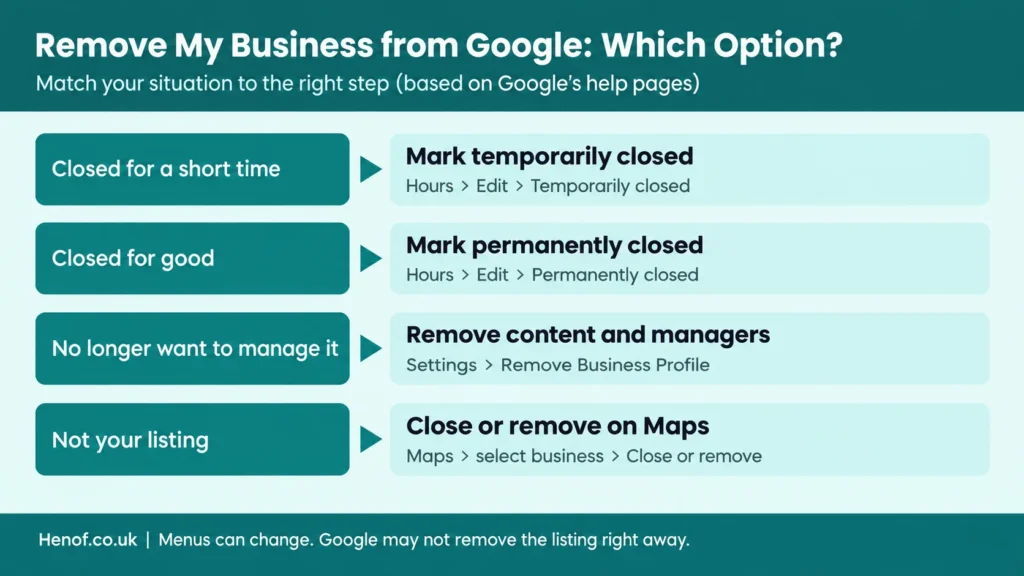
Table of Contents
Key Takeaways
- Marking a business closed keeps it visible with a closed label. Removing content and managers means you stop managing it.
- Removing content and managers permanently deletes owner posts, photos, videos and review replies, and cannot be undone.
- Only primary owners and owners can remove a profile, and new owners must wait 7 days.
- Your Business Profile and your website are separate, so removing one does not remove the other from Google.
- Google does not guarantee a removal timeline, so avoid guides that promise exact days.
How We Prepared This Guide
This guide follows Google’s own help pages for removing a Business Profile and removing a business from Maps, and we compared them with 2026 guides from other publishers. We did not remove a business ourselves for this update.
Menus can change, so check the labels in your own dashboard. Read our disclaimer and about page for how Henof works.
What changed in this update: we removed the unsourced “3 to 7 days” timeline, corrected what is deleted when a profile is removed, and added the ownership rules and website-removal steps.
Which Option Should You Choose?
Most people who search “remove my business from Google” want one of three things: to show that they have closed, to stop managing the profile, or to delete a duplicate. Pick the row below that matches your goal.
| Option | What it does | Best when |
| Mark temporarily closed | Shows the business as closed for now; you keep managing the profile | You are closed for a season, repairs or a break |
| Mark permanently closed | The profile stays on Search and Maps with a clear “closed” label | The business has shut down and you want customers to know |
| Remove profile content and managers | You stop managing the profile; owner posts, photos, videos and review replies are deleted | You no longer want to manage it, or it is a duplicate you created |
| Request removal on Maps (Close or remove) | You ask Google to review the place for removal | You do not manage the listing |
How to Remove My Business from Google: Step by Step
Option A: Mark the business as permanently closed
Use this when the business has shut down and you want customers to see that clearly. Google’s steps are:
- Open your Business Profile and select Edit profile.
- Select the Hours tab, then choose Edit next to Hours.
- Select Permanently closed and then Save.
The profile may still appear on Search and Maps, but it will clearly show that your business is closed.
Option B: Remove profile content and managers
Use this when you no longer want to manage the profile. Google says only primary owners and owners can do this, and new owners or managers must wait 7 days.
- Open your Business Profile, select the three dots, then Business Profile settings.
- Select Remove Business Profile, then Remove profile content and managers.
- If you want customers to see that you have closed, turn on “Mark your business as permanently closed”.
- Select Continue, then Remove, then Done.
To remove several profiles, select them in the Business Profile Manager, choose Actions, then Remove businesses. If you get an error, remove each profile individually.
Option C: Request removal of a business you do not manage
On Google Maps, click the business and choose Close or remove, then follow the prompts. Google reviews the request and may not remove the place, so do not expect an instant result.
Can I Remove My Business from Google Permanently?
Partly. Removing content and managers is permanent for your management access and for owner-added content, and you must re-verify to manage the profile again. The listing itself, however, may remain on Google, and Google says removal does not guarantee that it vanishes.
If you simply want to show that you have stopped trading, marking the business permanently closed is the clearest signal for customers. If you plan to reopen or move, edit the profile instead of removing it.
What Happens If I Remove My Business from Google?
- You can no longer manage the business directly through Search or Maps.
- Posts, photos, videos and review replies added by owners and managers are permanently deleted.
- A website created with Google Business Profile is permanently removed.
- The business may still appear for a while, with a closed label if you marked it closed.
- Customers lose your updates, so inform regular customers before you remove the profile.
Google’s help page lists what is deleted when you remove your management, but it does not say that customer reviews are deleted by this step.
Why Can’t I Remove My Business from Google?
If the listing is still there, check these common causes:
- You are not a primary owner or owner. Ask the current primary owner to remove it or to change your role.
- You became an owner or manager in the last 7 days, so Google blocks removal for now.
- Someone else, such as a former agency, still controls the profile. Request ownership or ask them to remove it.
- The place was created from public data or by users, so you may need to use Close or remove on Maps.
- Google has not processed the request yet. Check back after a few weeks and resubmit if nothing changes.
If you are unsure how your listing fits into local search, our guide to local SEO for a service business explains how listings work.
Business Profile, Website or Google Account: What Gets Removed?
People often mix these up, so keep them apart. Removing your Business Profile does not delete your Google Account, and it does not remove your website from Search.
To take website pages out of Google Search, remove the pages or add a noindex tag, and use the Search Console Removals tool only as a temporary hide. See Google’s guide to removing information on your website. For background on how search works, read our primer on what SEO is and how it works.
Accounts for other products, such as a payments or advertising account, have their own settings and are not removed by these steps.
Edit, Close or Remove My Business from Google: How to Decide
- Rebranding or moving: edit the profile, do not remove it.
- Closed for a while: mark it temporarily closed.
- Closed for good: mark it permanently closed so customers are not confused.
- Duplicate you created: remove its content and managers, then keep the correct profile.
- Not your listing: request removal on Maps.
Before You Remove My Business from Google
- Save the details you may need later, such as hours, photos and customer messages.
- Tell regular customers where to find you, and update other directories and your website.
- Check that you have owner access before you start, and confirm who else manages the profile.
- Decide whether the closed label should show, and set the toggle that way before you confirm.
If you are closing and want help managing your online presence during the change, see our list of top digital marketing agencies. More small business guides are in our business category.
Remove My Business from Google: Final Verdict
The right way to remove my business from Google depends on your goal: closing, stepping back or cleaning up a duplicate. Mark the business closed if customers should know, and remove content and managers only when you no longer want to manage it.
Remember that Google does not guarantee the listing will disappear, so check your dashboard and Maps after you finish.
About the Author
Abubakr is a content writer covering business and entrepreneurship topics at Henof. This guide follows Google’s help pages and was not tested on a live business. Reviewed by Afaque Hussain, link building and outreach specialist.
Frequently Asked Questions
Can I remove my business from Google permanently?
You can mark the profile permanently closed or remove its content and managers, but Google says the listing may still appear. Removing content and managers cannot be undone, and you must re-verify to manage the profile again.
Will removing my Business Profile delete my reviews?
Google says removal deletes posts, photos, videos and review replies added by owners and managers. Its help page does not say that this step deletes customer reviews.
How long does it take to remove a Business Profile?
Google does not publish a fixed timeline. A profile marked permanently closed does not leave Maps right away and may fade gradually, so check back after a few weeks.
Why can’t I remove my business from Google?
Common reasons are that you are not a primary owner, you became an owner within the last 7 days, someone else controls the profile, or Google has not acted on your request yet.
What happens if I remove my business from Google?
You lose the ability to manage the profile on Search and Maps, and owner-added content is deleted. The business may still show, with a closed label if you marked it closed.
Does removing my Business Profile remove my website from Google?
No. The profile and your website are separate. To remove website pages from Search you must remove them or use a noindex tag, and the Search Console Removals tool only hides them temporarily.
Can I remove my business from Google if I am not the owner?
You can ask Google to review it. On Google Maps, select the business and choose Close or remove, then follow the prompts.
