
Short answer: The right free AI face swap video tool depends on your free limits, clip length, watermark rules and how you plan to use the result. Magic Hour, the sponsor of this article, offers three free video swaps a day with no sign-up, for clips up to 10 seconds. Other options differ on credits, watermarks and commercial rights, so compare before you upload.
We did not test these tools hands-on. This guide uses each company’s published information and 2026 comparisons, and it explains consent and safety so you can use any free AI face swap video tool responsibly.
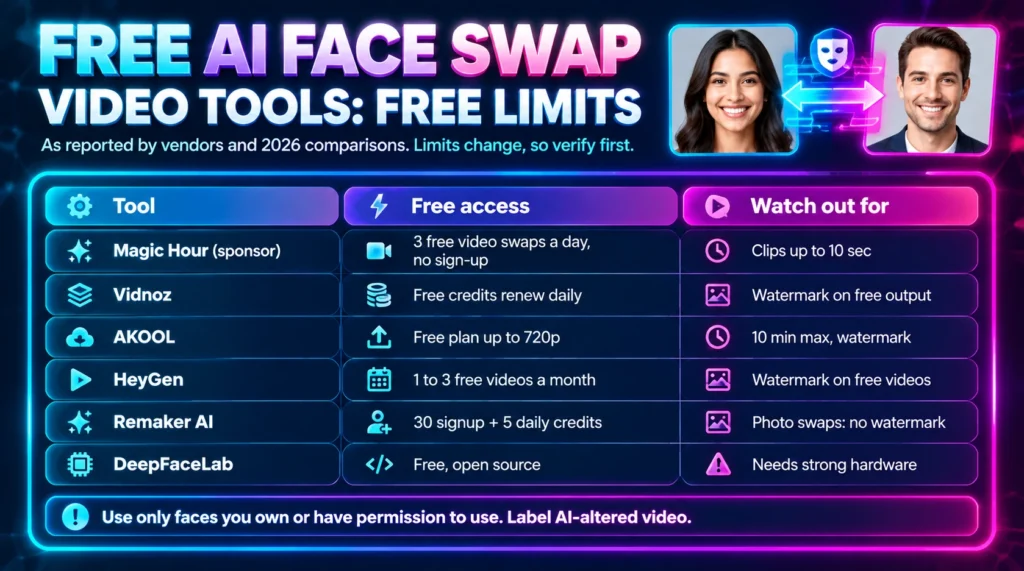
Table of Contents
Key Takeaways
- Free usually means limits: clip length, daily credits, resolution, watermarks or no commercial use.
- Sources sometimes disagree on watermark rules, so test a short clip before you plan a project.
- The best free AI face swap video tool for business may differ from the best one for quick social clips.
- Only swap faces you own or have permission to use. Non-consensual deepfakes can be illegal.
- Magic Hour is the sponsor of this article. Other tools are described from public sources.
Sponsorship and How We Prepared This Guide
Magic Hour sponsored this article, and the sponsored link is marked with a sponsored attribute. Sponsorship did not change how we describe the other tools. Read our disclaimer and about page for how Henof works.
We compared each tool’s public pages with independent 2026 comparisons, and we mark figures that come from vendors or reviews. What changed in this update: we removed first-person testing claims, replaced “best overall” rankings with use-case picks, and added limits, consent and safety sections.
Free AI Face Swap Video Tool Options at a Glance
| Tool | Free access (as reported) | Watermark on free output | Best for |
| Magic Hour (sponsor) | 3 free video swaps a day, no sign-up; clips up to 10 seconds | Check current rules; sources differ | Quick tests and creator workflows |
| Vidnoz | Free credits that renew daily | Yes on free output, per reviews | Casual clips and volume |
| AKOOL | Free plan up to 720p, 10-minute maximum video | Yes, per a 2026 comparison | Brand and campaign teams |
| HeyGen | 1 to 3 free videos a month, depending on region | Yes | Business avatar videos |
| Remaker AI | 30 signup credits plus 5 daily login credits | Photo swaps free of watermark; video varies | Simple photo swaps |
| Supawork | Says free with no sign-up, up to HD 1080 | Not clearly stated | Testing claims before use |
| DeepFaceLab | Free, open-source desktop software | None, but needs strong hardware | Technical users |
Limits change often, and some pages conflict, so confirm on each tool’s own site before you rely on a number.
What Is an AI Face Swap Tool and How Does It Work?
An AI face swap tool replaces one person’s face with another in a photo or video, and a free AI face swap video tool works the same way as a paid one. It detects faces in each frame, tracks landmarks such as eyes and mouth, generates a matching face with a trained model, and blends it into the footage.
Quality depends on a clear source photo, good lighting and a target video where the face is visible and not covered. Fast head turns and low resolution make results less stable.
7 Free AI Face Swap Video Tool Picks for 2026
1. Magic Hour (sponsor)
Magic Hour’s AI face swap video page says you can swap faces in video for free with no sign-up, three times a day. Free clips can be up to 10 seconds, and uploads and outputs on the free tool are deleted after one day.
It also lists multi-face swaps, a face swap API and commercial use for paid subscribers. Because sources differ on watermark rules for free exports, test a short clip first.
2. Vidnoz
Vidnoz gives free credits that renew daily, which suits quick tests and volume. Several reviews report that free output carries a watermark and limited resolution, and the company’s own pages have shown conflicting free limits, so check the current plan.
3. AKOOL
AKOOL targets brand and campaign work with video, group and live face swap. A 2026 comparison lists its free plan at up to 720p with a 10-minute maximum video and a watermark, and pricing is per seat.
4. HeyGen
HeyGen is an avatar video platform with a face swap feature. Its own help information lists one to three free videos a month depending on region, with a watermark on free videos.
5. Remaker AI
Remaker AI offers photo and video face swaps in the browser. One 2026 review says new users get 30 free credits plus five daily login credits, and that free photo swaps download without a watermark.
6. Supawork
Supawork’s page describes its face swap as free with no sign-up and HD output. Treat these as vendor claims, and test a clip before you depend on them.
7. DeepFaceLab
DeepFaceLab is open-source desktop software for technical users. It needs strong hardware and time, and it is built for deepfake creation, so use it only with consent and for legitimate research or editing.
Free AI Face Swap Video Tool Limits to Check
- Clip length and daily or monthly credits.
- Resolution and whether the free export has a watermark.
- Whether sign-up is required and how long uploads are stored.
- Commercial use rights on free versus paid plans.
- Safety rules: whether the tool blocks harmful or non-consensual uses.
Consent, Safety and Responsible Use
Before you try any free AI face swap video tool, remember that face swaps can be harmless fun but can also harm people. Only use faces you own or have clear permission to use, and never create sexual or deceptive content about real people.
Laws vary by country and region. In the US, for example, the TAKE IT DOWN Act of 2025 targets non-consensual intimate imagery, including AI-generated content. Major platforms also ask creators to label realistic AI-generated or altered media, so add a clear label when you publish.
For privacy basics, see our guide to cybersecurity essentials.
How to Choose the Right Tool
Use this checklist to pick a free AI face swap video tool that fits your goal:
- Start with your goal: a quick social clip, a business video or technical editing.
- List your must-haves: clip length, resolution, watermark-free export and commercial rights.
- Test two tools with the same short clip and compare quality and limits.
- Read the privacy and retention rules before you upload.
- Add a label when you publish AI-altered video.
For related reading, see our articles on AI face swap and video translation and a free AI image generator with no sign-up. Browse more in our AI category.
Free AI Face Swap Video Tool: Final Verdict
There is no single winner among free AI face swap video tool options. Short no-signup tests, business avatar platforms and technical software each fit a different need.
Compare limits and licences, test with the same clip, and use faces with permission. That approach gets better results and avoids problems.
About the Author
Azlan is a content writer covering technology and AI at Henof. This sponsored guide is research-based and was not tested hands-on. Reviewed by Afaque Hussain, link building and outreach specialist.
Frequently Asked Questions
What is the best free AI face swap video tool?
It depends on your limits and goal. For quick tests, look at tools with no-signup trials, short clips and clear watermark rules; for business videos, look at avatar platforms. Test two tools with the same clip before you choose.
Is there a free AI face swap video tool with no watermark?
Some tools advertise watermark-free output, but rules differ by video, photo and plan. Check the current plan page and test a short clip, because sources sometimes disagree.
How does an AI face swap tool work?
The tool detects faces in each frame, tracks facial landmarks, uses a trained model to generate a matching face, and blends it into the original footage while matching lighting and motion.
Is face swap legal?
Laws vary. Using your own face or faces you have permission to use is generally safe, but making or sharing non-consensual or sexual deepfakes is illegal in many places. Check local law and platform rules.
Can I use free face swap videos commercially?
Often not on free plans. Magic Hour, for example, says commercial use of video face swap outputs is allowed for paid subscribers, so check the licence of any tool.
Are free face swap tools safe for my photos?
Read the privacy policy and retention rules. Some tools say uploads are deleted after about a day, but practices differ, so avoid uploading sensitive images.
Who uses AI face swap tools?
Creators, marketers, agencies and hobbyists use them for social clips, ads, localization and entertainment, usually with their own or licensed faces.
